Kesel kan kalo web yang mau kita kunjungi ga mau connect,, padahal yang lain bisa....
Kenapa terjadi seperti itu ya? padahal cache dan cookies udah dihapus semua...
Direstart kompinya juga udah... Mungkin karena koneksinya, biasanya ISP kita yang ga resolve (nyambung) ke server tempat nyimpen data tuh website.
Aku punya cara resolving ke server dengan cara mudah:
Pertama:
Kamu harus tahu web tsb ada di server apa, caranya: ping domain/web yang mau kamu kunjungi, dengan cara (misalnya web yang mau dikunjungi adalah www.plurk.com):
> Klik START pada menu bar (ini kalo kamu pake OS Windows ya)
> Lalu klik RUN
> Ketik "cmd" nanti keluar prompt DOS
> Ketik "ping" spasi "plurk.com" (enter)
Nanti keluar IP Servernya:
yaitu: 74.120.121.16
Kedua:
> Kamu masuk ke C:\WINDOWS\system32\drivers\etc
> Setelah itu OPEN file "hosts" dengan NOTEPAD
> Masukkan: "74.120.121.16 plurk.com" di bawah ip localhost
> Setelah itu notepad di SAVE
> Refresh/reload kembali browser kamu
Semoga Berhasil~~
がんばって!!!
Thursday, October 7, 2010

Thursday, September 30, 2010
Berhenti Berlangganan RBT
Berhenti Berlangganan Ring Back Tone (RBT) – Nada Tunggu – Nada Sambung XL
Setelah Googling, caranya UNREG RBT XL : ketik UNSUB kirim ke 1818
Bandingkan dengan operator lain yang memuat cara berhenti berlangganan dalam website mereka masing-masing :
- Indosat (Mentari, IM3, Starone) i-Ring, Mentari ketik STOP kirim ke 808, Starone ketik : UNREG kirim ke: 808, M3 ketik UNREG kirim ke 808. Jika tidak berhasil ketik: STOP kirim ke 808
- Telkomsel NSP 1212, ketik: RING
OFF Kirim ke: 1212 - Nada Sambung Esia, ketik RING[spasi]UNSUB kirim ke 8888
- Fren Ringgo ada di website mereka : http://ringgo.mobile-8.com/en/index.jsp
- Natrindo Telekom Selular (AXIS) ketik : OFF kirim ke 333
- Telkom FLEXI ketik: RING(spasi)OFF kirim ke 1212
Informasi berhenti berlangganan RBT XL ada di dalam website XL tapi linknya terlalu dalam, membingungkan dan ribet!
Update (2): Untuk berhenti Fren-Ringgo (dari tsphand1 di kolom komentar)
Fren
ketik : RINGGO HAPUS
kirimkan ke : 2525
Jika ada balasan,
ketik : ya
kirimkan ke : 2525
dari blognya Reza Yazdi
Thursday, July 29, 2010
Recycle Bin Hilang
Hari ini chatting sama Ai Sari
en liat statusnya katanya foto2 di MMCnya ke delete *berarti ga sengaja ya Ai?*
trus kuminta cari di recycle bin, tp katanya ga ada recycle bin nya... hmmmmm,, ilang kmana ya?
apa mungkin folder ke hidden....
mo coba bantuin, tapi dianya buru2 off... yawdah bantu yg lain kali aja perlu :)
nanya2 om google nemunya ini:
Cara pertama
- Klik kanan area kosong di desktop.
- Pilih [Properties].
- Klik tab [Desktop].
- Klik tambol [Customize Desktop...].
- Klik [Restore Default].
- Tutup semua jendela dan restart Windows.
Cara kedua
- klik [start]>[Run...] lalu ketik regedit.
- masuk ke HKEY_LOCAL_MACHINE\SOFTWARE\Microsoft\Windows\CurrentVersion\Explorer\Desktop\NameSpace.
- Pada sisi kanan window, klik [New]>[Key] dan masukkan {645FF040–5081-1O1B-9F08- 00AA002F954E } sebagai nama key yang baru.
- Tekan, [Enter].
- Tutup Registry Editor dan restart Windows.
Sumber dr Abragus Sabra
Monday, June 21, 2010
Over Inbox Gmail
Kalian yang punya gmail, mungkin pernah males baca inbox kan.. Pengalaman pribadi sih gitu. Nah baru nyari nih caranya supaya semuanya dimarked as READ secara CEPAT. Jadi ga usah buka satu1 emailnya atau hapus satu1.
Just type:
di search Mail

Semoga bermanfaat.
dapat dari sini
Just type:
is:unread or label:unreaddi search Mail
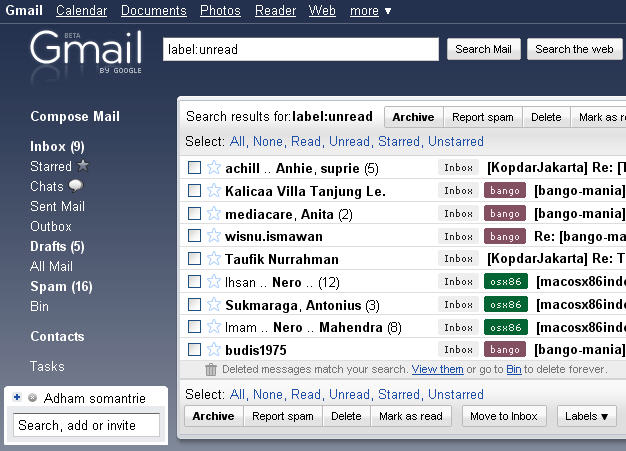
Semoga bermanfaat.
dapat dari sini
Thursday, June 17, 2010
Zionist Candle
Dari Solidaritas Muslim Anti 15r43l & Yahudi, dimohon untuk:

Buka komputer Anda pada direktori:
C:\Program Files\Microsoft Office\MEDIA\CAGCAT10
cari gambar bernama J0285926
Anda akan temukan gambar Lambang/bendera zionis 15r43l lengkap (persis dengan warna aslinya) dengan lilin (sarana ibadah mereka).
HAPUS!

Gambar tersebut ada di semua PC di seluruh dunia. Kecuali mungkin yang pake LINUX + openoffice keanya ga ada ...!!
Tuesday, June 15, 2010
Saturday, June 12, 2010
How to Permanently Delete a Facebook Account~
1. WHY?
Yang pasti karena FB punya Yahudi. Si Mark Zuckerberg pasti diuntungkan karena banyaknya member FB dan naikkin ratingnya. Karena banyak member berasosiasi dengan banyak iklan. KIta ga klik iklannya pun, dia tetap untung.
Banyak yang tidak tahu bahwa pay-per-click bukanlah satu satunya cara sebuah social networking meraup untung. Bisnis advertising di dunia social networking semacam facebook dan friendster menjadikan populasi sebagai patokan bahwa semakin banyak orang yang melihat iklan tersebut maka semakin banyak orang akan memasang iklan di sana. Semakin banyak yang beriklan maka situs jejaring sosial tersebut mendapat banyaak tawaran iklan dan meraup keuntungan. Sumber: Ana
Selanjutnya mungkin kita harus belajar tentang social network advertising. So, buat apa bertahan di tempat... beuh... susah memang memutus silaturrhim. Tapi kan ga beneran.. Saya susah payah mencari pembenaran untuk tetap bertahan, tapi ga bisa... terbayang wajah2 muslimin Palestine.. Mungkin itu hidayah dari Allah. Amiin.
2. Before You Start
Facebook makes it pretty easy to deactivate your account which will temporarily hide your information. However, if you want to permanently remove your information, the "permanent delete" option is much harder to find. This article will cover two easy ways to erase your Facebook account so you can Quit Facebook forever.
* Remove Facebook Connect logins. Many sites, like Digg.com and Meetup.com, allow signup and login using Facebook Connect -- List of Facebook Connect sites (may not be complete or current.) If you have accounts on such sites, go to each of them, and:

Yang pasti karena FB punya Yahudi. Si Mark Zuckerberg pasti diuntungkan karena banyaknya member FB dan naikkin ratingnya. Karena banyak member berasosiasi dengan banyak iklan. KIta ga klik iklannya pun, dia tetap untung.
Banyak yang tidak tahu bahwa pay-per-click bukanlah satu satunya cara sebuah social networking meraup untung. Bisnis advertising di dunia social networking semacam facebook dan friendster menjadikan populasi sebagai patokan bahwa semakin banyak orang yang melihat iklan tersebut maka semakin banyak orang akan memasang iklan di sana. Semakin banyak yang beriklan maka situs jejaring sosial tersebut mendapat banyaak tawaran iklan dan meraup keuntungan. Sumber: Ana
Tapi WordPress juga punya orang Yahudi mba Ana,,, CMIIWheuheu,, google dan yahoo juga seh T_T
Selanjutnya mungkin kita harus belajar tentang social network advertising. So, buat apa bertahan di tempat... beuh... susah memang memutus silaturrhim. Tapi kan ga beneran.. Saya susah payah mencari pembenaran untuk tetap bertahan, tapi ga bisa... terbayang wajah2 muslimin Palestine.. Mungkin itu hidayah dari Allah. Amiin.
2. Before You Start
Facebook makes it pretty easy to deactivate your account which will temporarily hide your information. However, if you want to permanently remove your information, the "permanent delete" option is much harder to find. This article will cover two easy ways to erase your Facebook account so you can Quit Facebook forever.
* Remove Facebook Connect logins. Many sites, like Digg.com and Meetup.com, allow signup and login using Facebook Connect -- List of Facebook Connect sites (may not be complete or current.) If you have accounts on such sites, go to each of them, and:
- make sure you have a way to login that does not involve Facebook Connect (you will most likely have to create a username and password on the site if you haven't already.)
- logout of the account, then log back in using the alternate method (not using Facebook Connect), ensuring that you will be able to access the account after your Facebook account is deleted.
Short Method 1
- Copy and paste http://www.facebook.com/help/contact.php?show_form=delete_account once you have logged on. This screen will present itself:
- Click "Submit" and follow instructions. There will be a simple password and a Captcha spam check to enter in. Captcha spam checks are to make sure you are the real owner of your account and not an automated program.
- Do not login or connect with your Facebook account. You will receive an email saying that your account will be deleted in 14 days. Any interaction with the account during that period could prevent it from being deleted, so for 14 days:
- do not try to login to your Facebook account; you may want to clear your browser cache and delete your cookies so that you don't login inadvertently.
- do not click the Facebook Share or Like button on any site you visit.
- do not use Facebook Connect to login to or signup on any site (see Before You Start, above.)
- Wait and watch. At the end of 14 days, all of your posts, comments, info, etc., will be permanently made inaccessible on Facebook.


Longer Method 2
If the short method does not work for you, here is the longer method that sets out how to get to the deletion button.- Go to the bottom of the home page. Click on the "help center" (http://www.facebook.com/#!/help/?ref=pf).
- At "help center", type in "Delete Facebook" into the search box at the top of the page. Click "Search".
- Arrive at the page titled "Facebook FAQs". Look down the list of FAQs and open the one called: "I want to permanently delete my account. How do I delete my account?"
- Read the Facebook information - it basically asks you whether you want to deactivate your account or delete it permanently. (Deactivating means that Facebook retains your profile information (friends, photos, etc.) but you have disappeared from the Facebook service.) Facebook makes it clear that if you want your information removed forever, you can never recover the information and it will be wiped for good.
- Click on https://ssl.facebook.com/help/contact.php?show_form=delete_account. You will be reminded that this is a permanent deletion and that your account cannot be reactivated and that none of the content or information you have added can be retrieved.
- Click submit. Follow the steps, such as entering your password, email, and Captcha code.
- Do not log in for the next 14 days and your account will be deleted completely. Note, however, that if you change your mind before the 14 days period is up, just log in and this will reactivate your account!


Emailing Facebook to delete the account
To speed up the process and if the above failed, try emailing Facebook.- Email Facebook directly. The email is: privacy@facebook.com. Request that Facebook deletes your account.
- Wait to get an email response from Facebook confirming that your account has been permanently deleted. This should take a few days.
- If you don't hear back from Facebook within a week, email them again. This time, not only email Facebook at privacy@facebook.com, but also send an email to support@facebook.com and one to info@facebook.com.
- Finally, attempt to log in to your account once you get an email from Facebook. If you're unable to log in and don't get a message asking you to reactivate your account, your Facebook account has been permanently deleted.
Deactivation
- If you're not one hundred percent sure that you want to permanently remove all that information, you can temporarily "deactivate" your Facebook account. Just follow the detailed instructions at How to Deactivate a Facebook Account.
Subscribe to:
Posts (Atom)



 Posts


